Digital Saathi
Making agricultural support accessible to farmers.
Designed for Cargill, Digital Saathi brings crop guidance, market information, weather, community support, and essential farming services into one mobile and web platform for farmers.
Small-landholder and progressive farmers
Primary age range: 20–60 years.
Karnataka and Madhya Pradesh
Davangere and Chhindwara formed the initial focus.
Cross-functional field team
I worked as the product designer alongside 1 tech lead, 2 PMs, 5 engineers, 5 product owners, and 48 ground-team members.
Business goal
Improve smallholder farmers’ economic well-being and participation in the digital economy.
Build a supportive ecosystem that improves productivity and profitability.
Core user needs
- Current nearby market prices and fair value realisation
- Fast crop-disease identification and preventive guidance
- Accurate weather and crop-health monitoring
- Competitive agricultural inputs and farmer connections
- Relevant news, schemes, events, and expert services
01 · The challenge
Farmers had to piece together advice, prices, products, and support from disconnected sources.
Existing apps addressed individual tasks, but everyday decisions still depended on local shops, other farmers, family members, and several digital services.
For Cargill, the product opportunity was to create one dependable point of access to crop guidance, market information, weather, and farming services.
My design challenge was to make that breadth understandable for farmers with different reading abilities and levels of smartphone experience.
Services were scattered
Prices, weather, crop care, and buying or selling were available in different places.
Farming apps were rarely used
Only 10% of the farmers surveyed used an agriculture app.
Trust was essential
Farmers needed clear information before spending money or treating a crop.
02 · Research
Field evidence defined what the first release needed to solve.
I combined farmer interviews, observation, survey responses, and competitive research to understand both practical needs and the barriers to adopting another farming app.
01Discover
02Define
03Ideate
04Prototype
05Test
Design implication: farmers already used Facebook, WhatsApp, YouTube, and a few farming apps. Reusing familiar patterns and plain language would lower the effort required to learn Digital Saathi.
Primary persona
Meet Rudrappa

50 years · Karnataka
Maize farmer
He wants nearby crop prices, local weather, and clear help when a crop becomes unhealthy.
Frustrations
- He depends on his son to use a smartphone.
- He is unsure whether crop prices are fair.
- Buyers change prices based on crop quality.
- Expert advice is not always available nearby.
Goals
- Find the nearest market and current crop price.
- Check earlier prices before deciding when to sell.
- Ask an expert about crop disease and treatment.
Interview highlights
What farmers told us.
Q
Can you easily get good seeds and fertiliser?
A
Good products cost more and are not always available nearby.
Q
What is difficult when you sell your crop?
A
Prices change often. I do not always know if I am getting a fair price.
Q
Who helps you when insects or disease harm the crop?
A
I ask other farmers or the local agriculture officer.
Q
How do you know that a crop is unhealthy?
A
I look for changes in the leaves and plant. If I am unsure, I ask an expert.
Survey results
Four answers guided the product.
55%
Do you use a smartphone?
Yes 55%No 45%
10%
Do you use a farming app?
Yes 10%No 90%
15%
Do you get a fair crop price?
Yes 15%No 85%
75%
Is advice from other farmers helpful?
Yes 75%No 25%
Competitive research
No single competitor covered the complete farming journey.
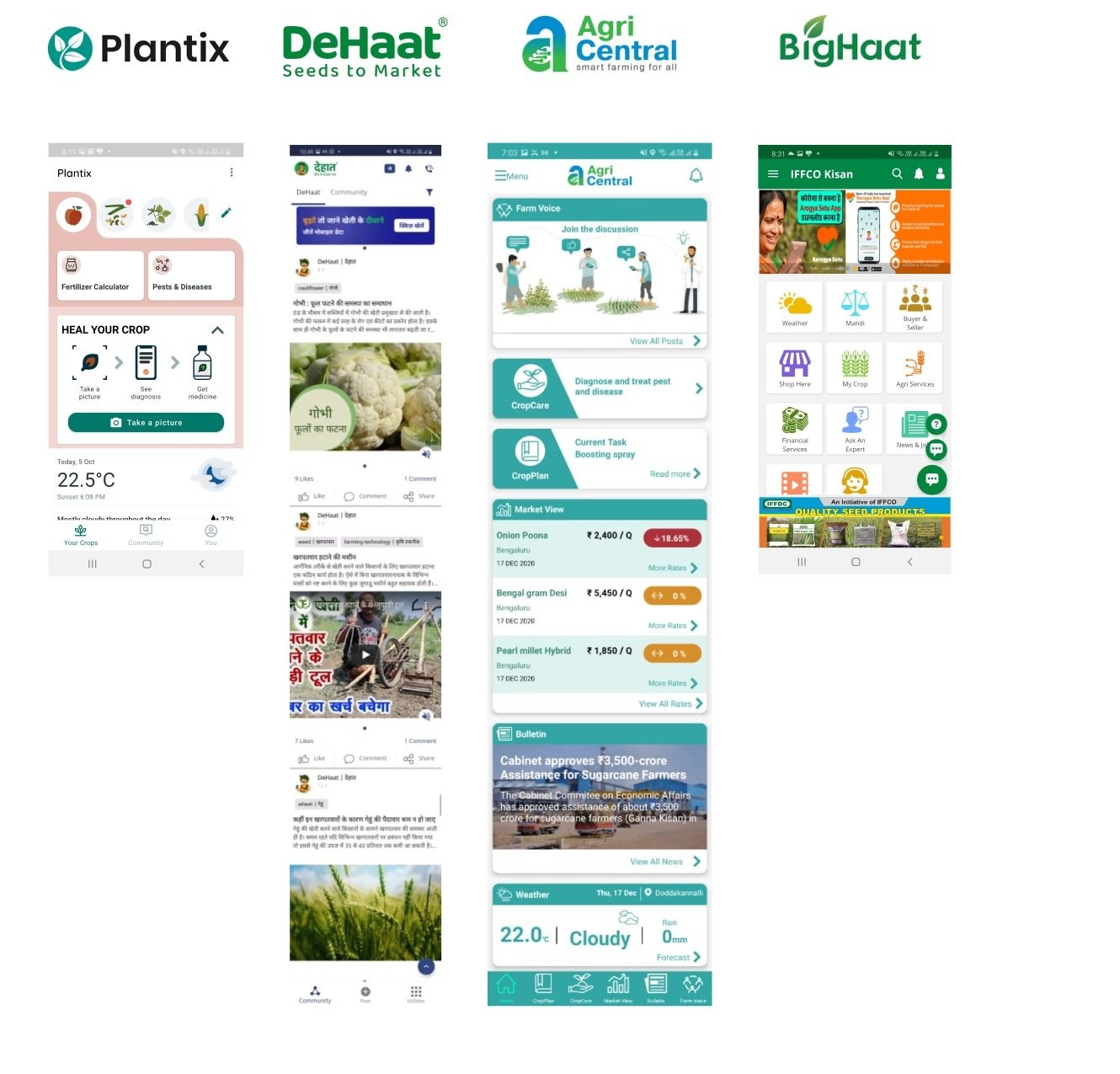
I compared Plantix, DeHaat, AgriCentral, and BigHaat across diagnosis, market prices, community, inputs, and weather. Each product solved part of the problem; the gap was a coherent service that connected those needs.
FeaturePlantixDeHaatAgriCentralBigHaat
Photo crop diagnosis✓×✓×
Market prices××✓✓
Farmer community✓✓✓×
Buy farming inputs×✓×✓
Weather information✓×✓✓
What this changed
- Prioritise the farmer problems supported by both field and competitive evidence.
- Connect high-value services through one predictable product structure.
- Make reliability, transparency, and clear language requirements across every service.
Farmer perspective
Empathy Map
Synthesising what farmers thought, felt, said, and did kept the product focused on fair value, crop health, and access to dependable advice.
Shared focusFarmer needs and goals
- Direct selling could give me a better profit.
- Depending on middlemen makes prices uncertain.
- I need an easier way to check crop health.
- I feel undervalued and exploited by middlemen.
- I need a reliable source for crop prices.
- Managing crops better would reduce stress and improve my livelihood.
- “Middlemen pay too little for my crop.”
- “I need help with crop care.”
- “Farm supplies should be affordable.”
Goal Earn a fair price, protect the crop, and improve the farm’s livelihood.
- Checks crop prices at the market.
- Asks nearby farmers for crop-disease and maintenance advice.
- Visits local stores for fertilisers, despite the cost and travel time.
Research questions
How Might We
I translated the recurring needs into opportunity questions so the team could explore solutions without committing to features too early.
make the app easy to hear and read?
connect farmers directly with producer groups?
show local market prices clearly?
help farmers improve their crop practices?
help farmers identify pests and crop disease quickly?
03 · Ideate
Turn field evidence into a focused first release.
Research produced more opportunities than one release could support. I used prioritisation to define the essential feature set, then organised it into a structure farmers could learn.
01
Feature prioritisation
MoSCoW Method
MoSCoW separated essential farmer needs from useful later additions. Market prices, Crop Doctor, weather, selling, news, and the forum formed the core first-release proposition.
01
Must have
- Market price
- Crop Doctor
- Weather card
- Agri output market
- News
- Forum
02
Should have
- Agri input market
- Help centre
- Profile
- Notifications
- My tasks
- KYC and address
- Language
03
Could have
- Farm advisory
- My Farm
- Feedback and rating
- Share and refer
- Text size
04
Won’t have now
- Crop insurance
02
Product structure
Information Architecture
A guided onboarding path leads to one homepage, while five predictable destinations keep a broad service ecosystem understandable.
Onboarding
- Splash screen
- Language screen
- Login
- Phone number
- OTP
- Crop selection
Start hereHomepage
Home
- Service offer cards
- Buy and sell
- Advisory services
- Other services
- Weather card
Forum
- Help videos
- Search
- Filter
- Create post
- Posts
Market Price
- Select crop
- Select variety
- Sort by price or distance
- Mandi price cards
- 7-day price trend
Notifications
- Notification settings
More
- Profile
- KYC document
- My address
- Language
- Text size
- Share and refer app
- Help and support
- Settings
- Rate app
- Log out
Design system
A familiar visual language reduced learning effort.
Noto Sans, the product-green scale, compact feedback patterns, and familiar mobile controls supported readability across varied literacy and smartphone experience.
Brand colours
Primary colour#12A980
Verified from the visible swatch and original product UI.
Primary colour tints
Grey scale
Typography
Noto Sans
Heading · Semi Bold
40 px
28 px
22 px
18 px
16 px
12 px
Heading · Bold
50 px
40 px
28 px
22 px
18 px
16 px
12 px
Body Text · Regular
Readable guidance · 16 px
Supporting information · 14 px
Helper text · 12 px
Body Text · Medium
Readable guidance · 16 px
Supporting information · 14 px
Helper text · 12 px
Buttons
Alerts & feedback
This is a neutral message
×This is a success message
×This is an error message
×Statuses
Verified ✓Pending ✓In progress ✓Review ✓Completed ✓
Tabs
Term 1Term 2
Market priceOverview
Text fields
Error message
Mobile icons
24 px · outlined and active states
04 · Solution
A priority problem from the research:
Help farmers move from a crop symptom to actionable guidance.
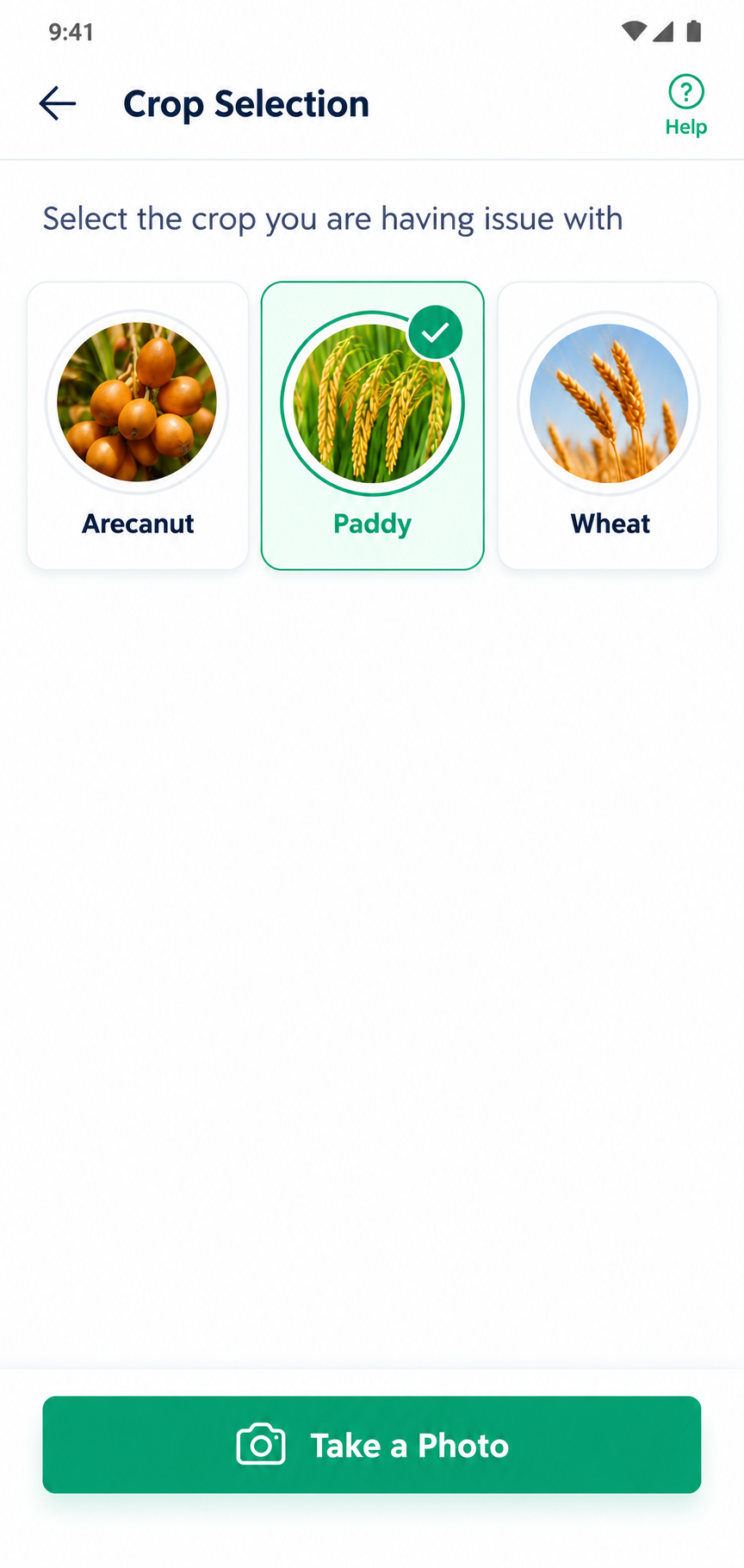
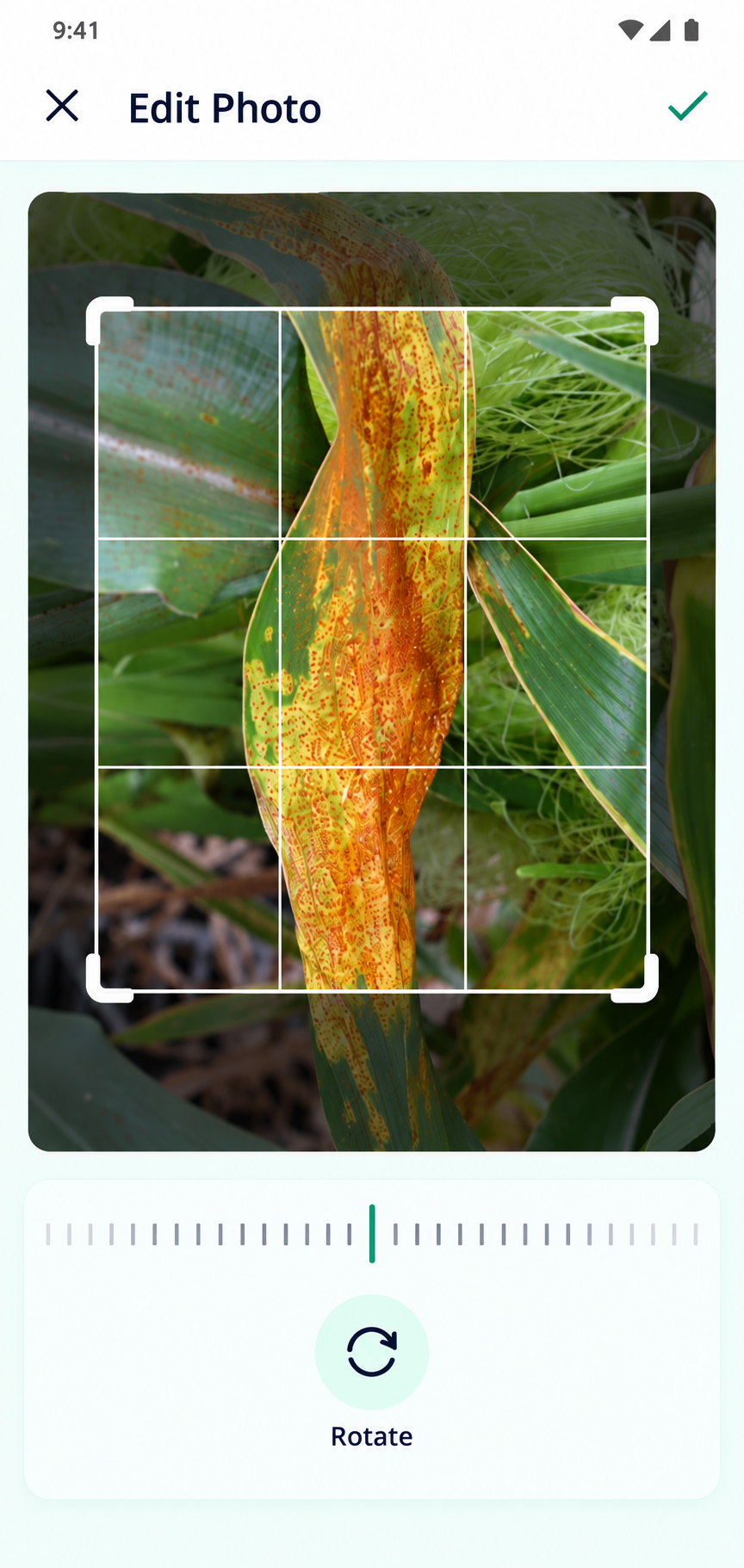
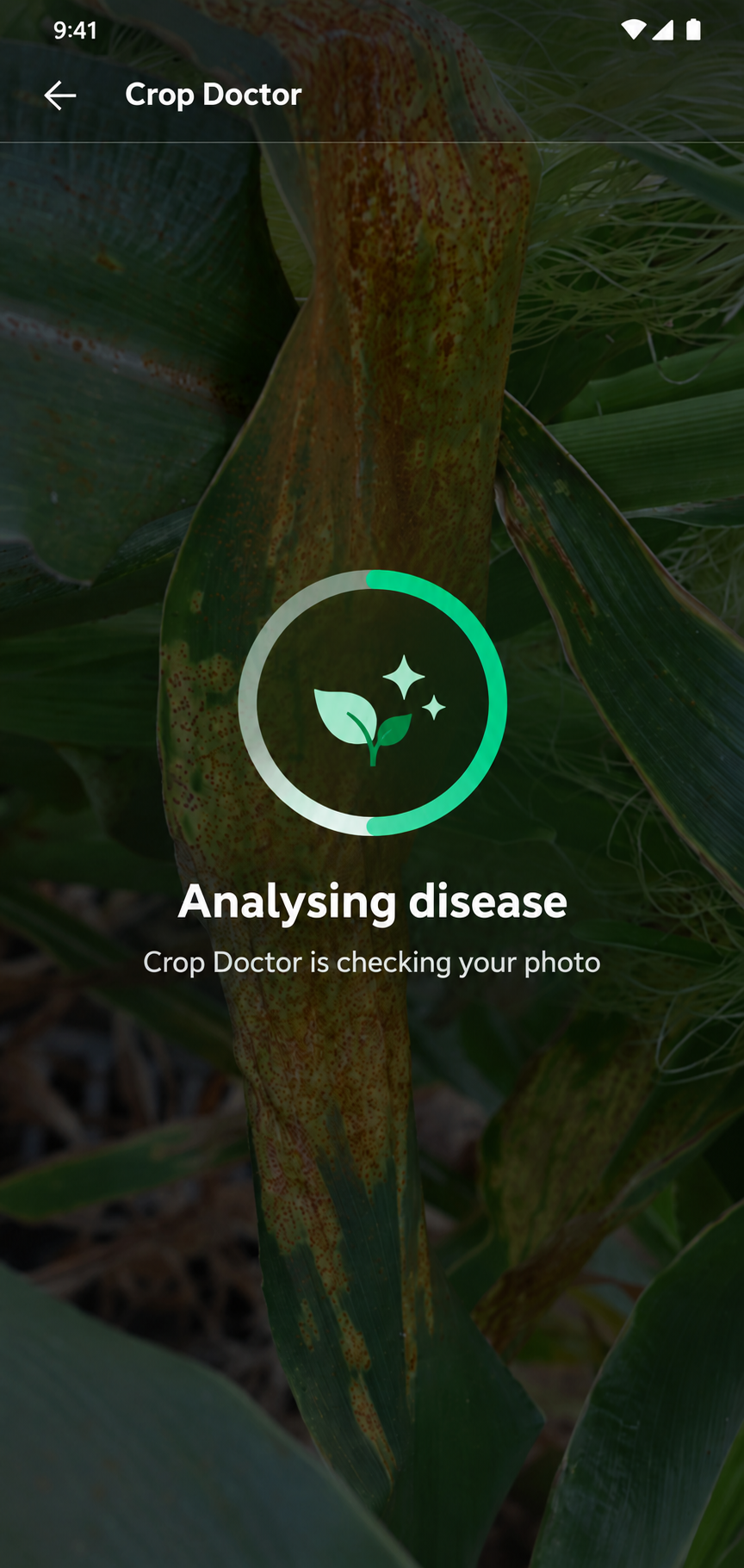
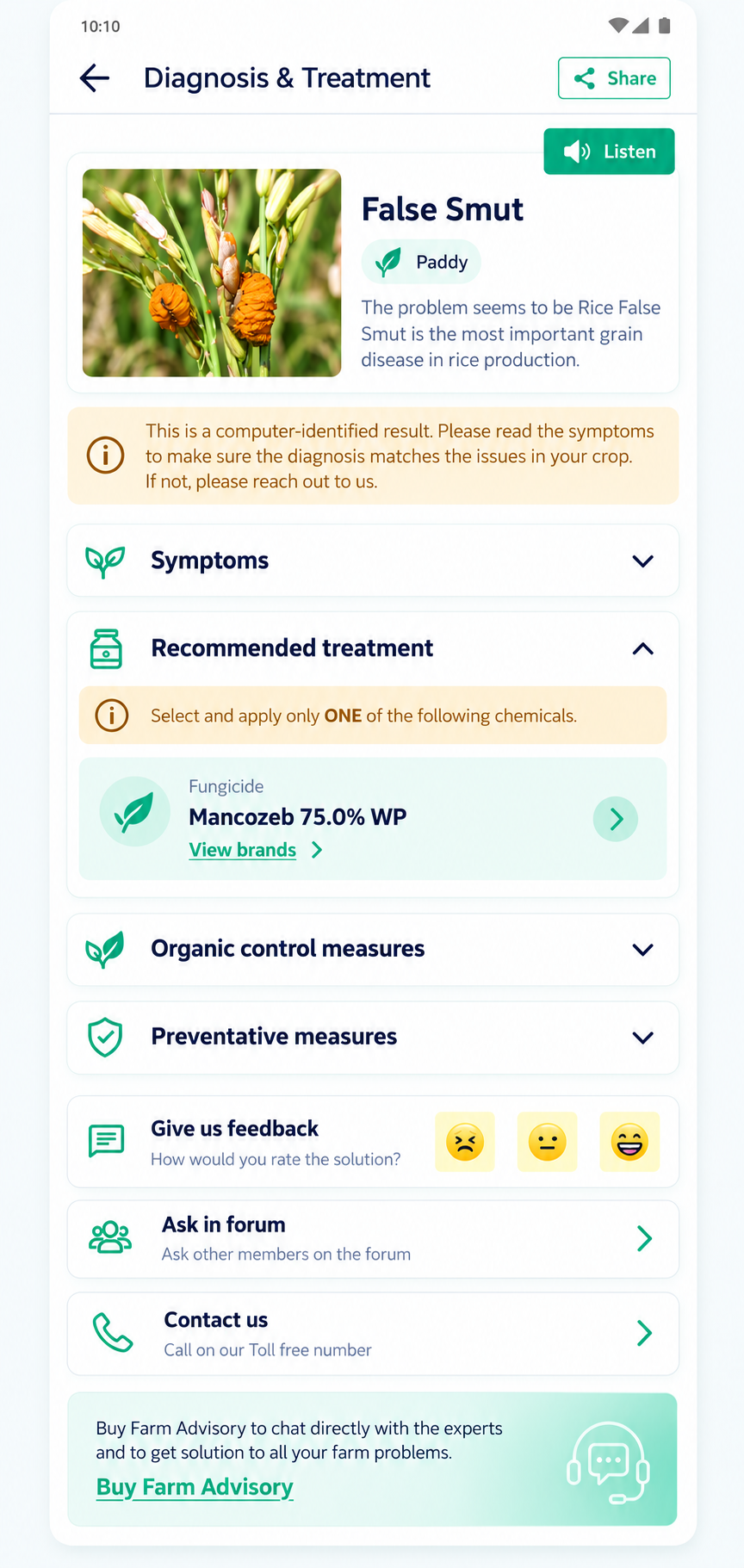
Crop Doctor turns a complex diagnostic process into four understandable steps: select a crop, take or upload a photo, wait for analysis, and review the likely disease and treatment.
Select crop→Take or upload photo→Model checks disease→View solution
How it works
Present an AI result with appropriate caution.
- DAE field teams collected thousands of crop-disease photos from different angles and lighting conditions.
- The photos were labelled in the content management system and resized from high resolution to 224 × 224 pixels.
- A convolutional neural network learned the shapes, colours, and visual patterns linked to each disease.
- When a farmer uploads a new photo, the model compares it with the patterns learned from the earlier images.
- Testing produced about 80% accuracy, so the result is shown as guidance rather than a final expert diagnosis.
Version 1
The original flow established the diagnostic journey; usability testing then revealed where farmers needed more guidance and treatment detail.
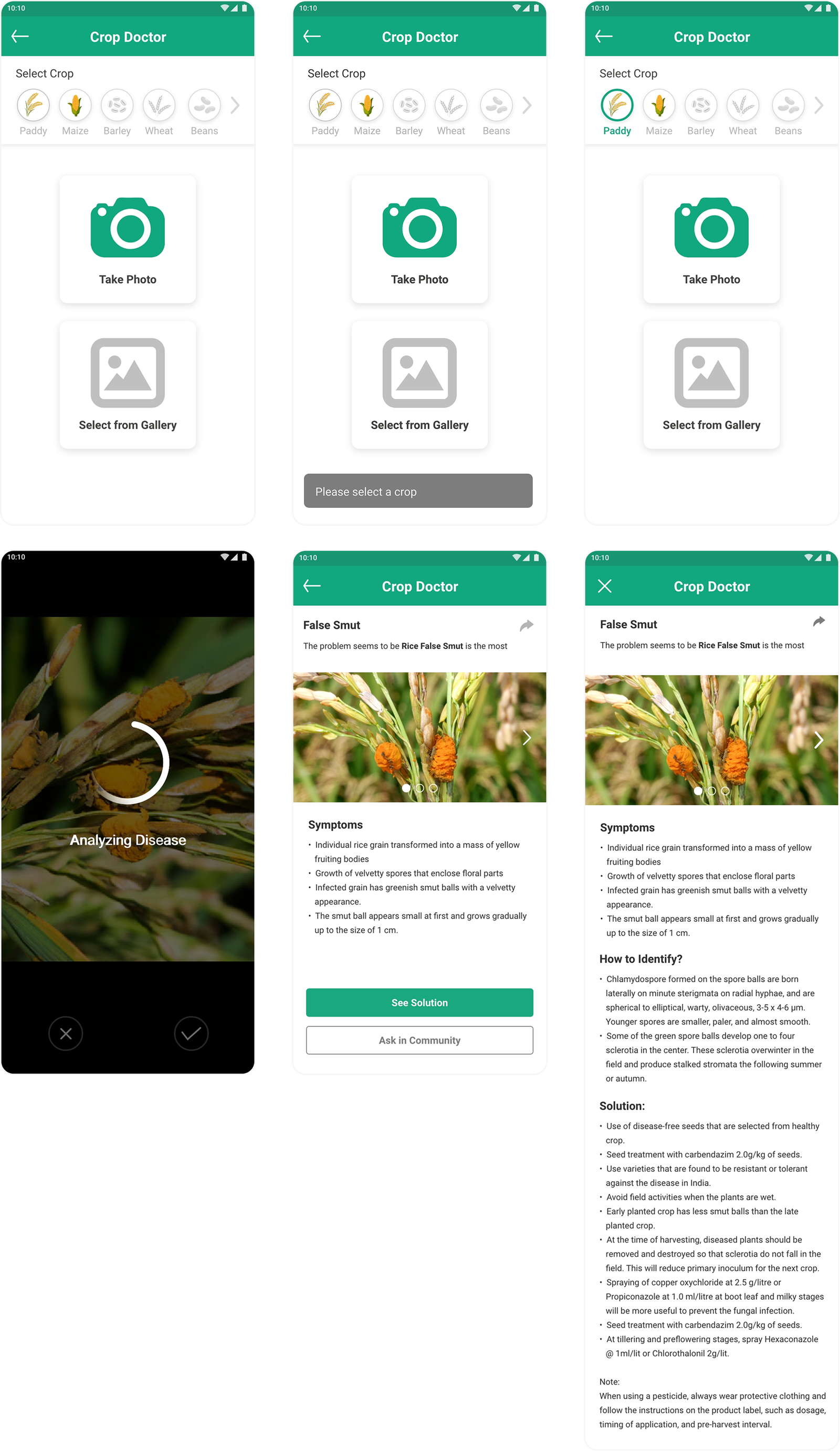
Usability findings
- Some farmers found it difficult to move through the flow.
- Farmers wanted treatment options, organic controls, and clear quantity guidance.
Version 2
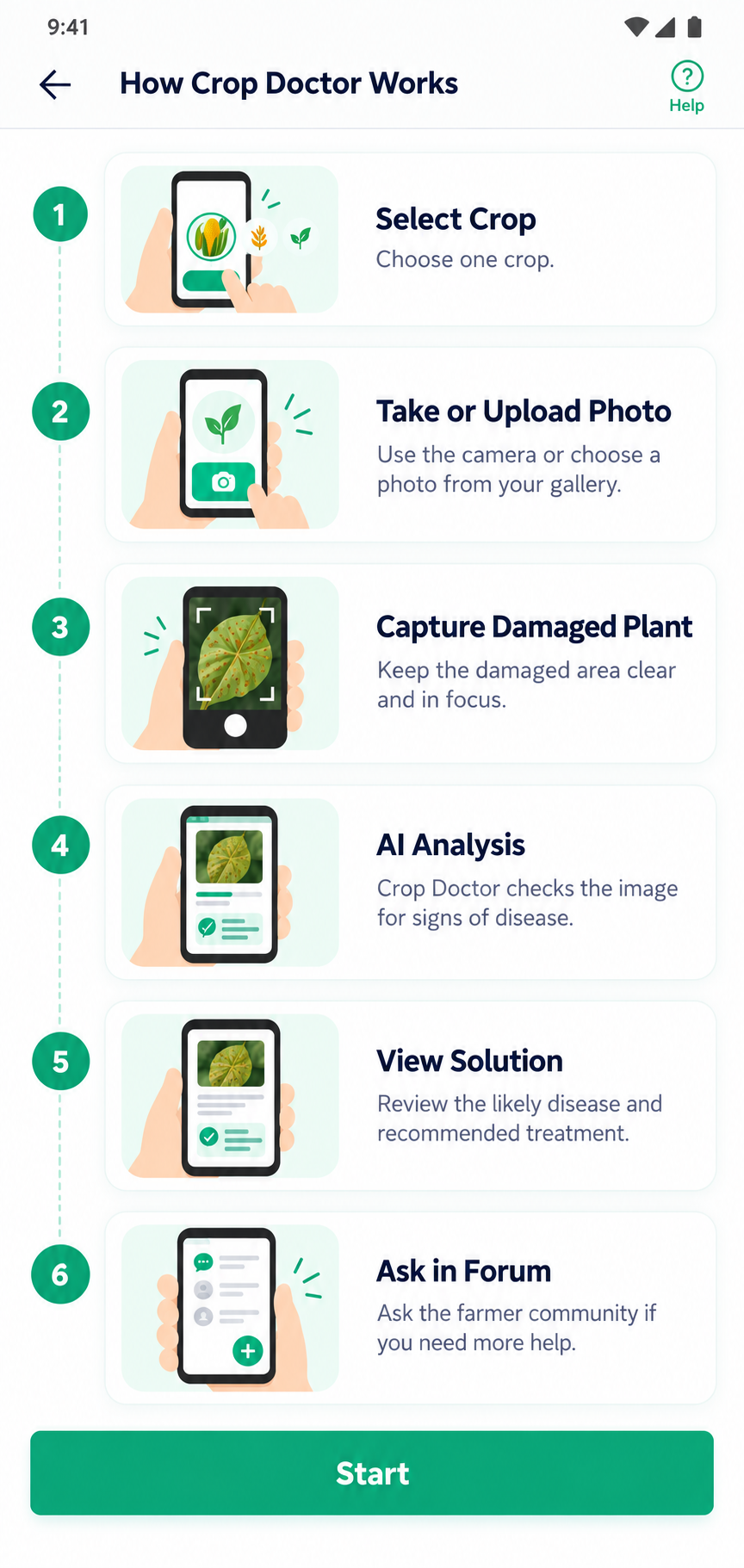
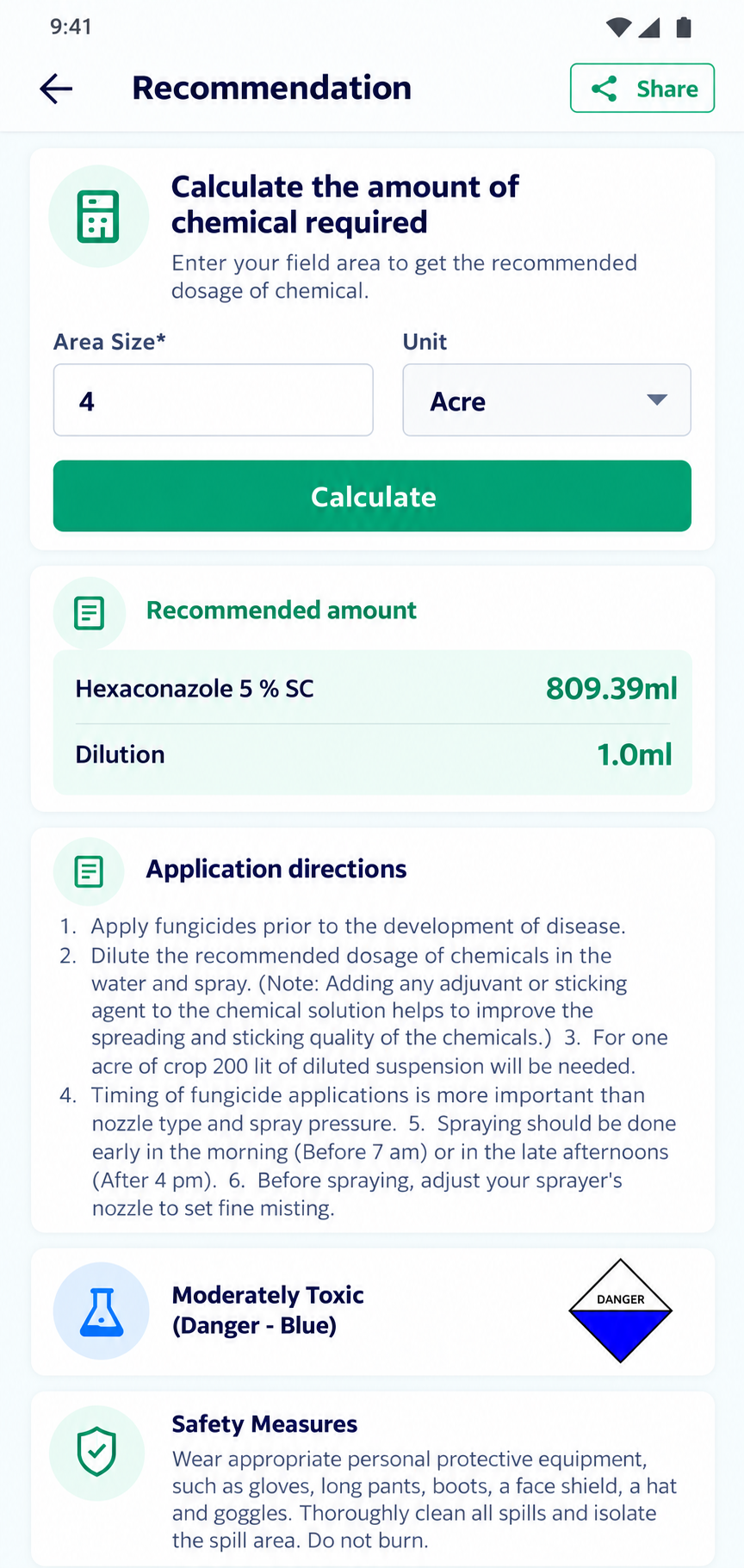
The second iteration responds directly to those findings with onboarding, clearer crop selection, photo editing, detailed treatment guidance, quantity calculation, and enquiry history.
10:10
10:10
10:10
10:10
10:10
10:10
10:10
Test findings
- Onboarding and the help video made the flow easier to understand.
- New farmers could move through the steps more easily.
- Farmers liked receiving an immediate disease result and solution.
- Farmers could calculate the chemical quantity needed per acre.
05 · Impact
Documented product metrics moved in a positive direction.
Following the new homepage and onboarding, the recorded metrics showed longer sessions, higher feature adoption, and a lower bounce rate.
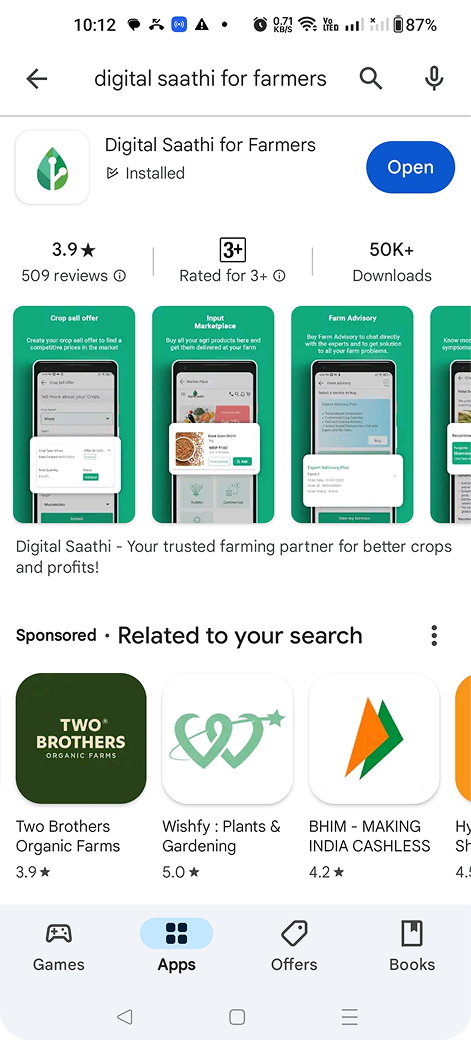
Play Store result50K+ installs3.9-star rating
01 · Challenge
Parents needed confidence before committing to a baby product.
Online shopping asked parents to decide without checking size, fit, material, comfort, or safety in person. Paying first and navigating uncertain returns concentrated that risk at the point of purchase.
Increase AOV and improve conversion.
Create a viable path to purchase without adding uncontrolled margin risk.
Feel confident before committing.
Let parents evaluate the product and understand the return promise before they pay.
Design hypothesis
Three testable assumptions framed the opportunity.
- 01
If users can try products at home, cart abandonment should reduce.
- 02
If returns are transparent and immediate, trust should improve.
- 03
If eligibility is controlled, margin risk can remain within safe limits.
02 · Research
Evidence showed where purchase confidence was breaking down.
Competitive research established the market gap. Interviews with 15 parents then connected that gap to three specific barriers: physical verification, return anxiety, and discomfort with paying before evaluation.
Competitive research
Speed alone did not resolve purchase risk.
| Competitor | Delivery speed | Baby specialization | Try & Buy | Emotional reassurance |
|---|---|---|---|---|
| FirstCry | Medium | High | × | Medium |
| Hopscotch | Low | High | × | Medium |
| Blinkit | High | Low | × | High |
| Zepto | High | Low | × | High |
| Myntra | Low | Medium | ✓ | High |
| Slikk | Low | Medium | ✓ | Low |
The opportunity was the combination: speed, baby specialization, and a lower-risk way to purchase.
User research
Three signals made the trust gap visible.
Need for physical verification
Parents wanted to check size, fit, material, and comfort before committing.
High return anxiety
Complicated return expectations made the purchase feel risky.
Low confidence in “pay-first” models
Paying before evaluation created hesitation at the final decision point.
03 · Solution
A confidence journey, not an isolated checkout feature.
The research showed that uncertainty began well before payment. I therefore introduced Try & Buy during discovery, clarified eligibility during evaluation, and reinforced returns and pricing at the final decision.
- 01Home
Awareness & discovery
- 02Listing
Confidence building
- 03Product
Decision clarity
- 04Cart
Trust & transparency
- 05Delivery
Reassurance
- 06Return
Safety net
Design direction
Each decision answers a different source of uncertainty.
Early visibility addresses discoverability, guidance explains the unfamiliar service, variant-level eligibility prevents false expectations, and transparent billing protects trust at checkout.
A · Entry & awareness
Design exploration for the entry point.
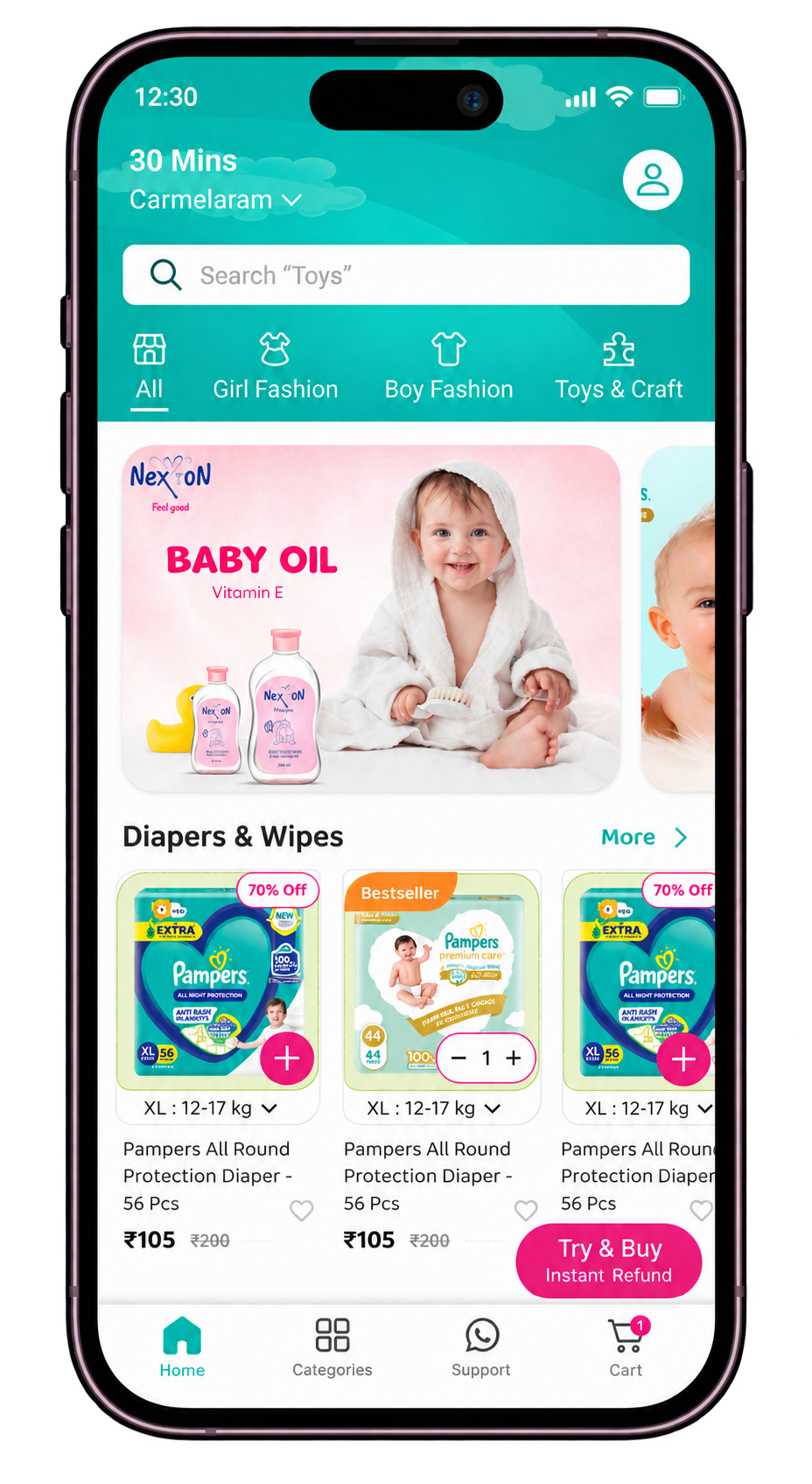
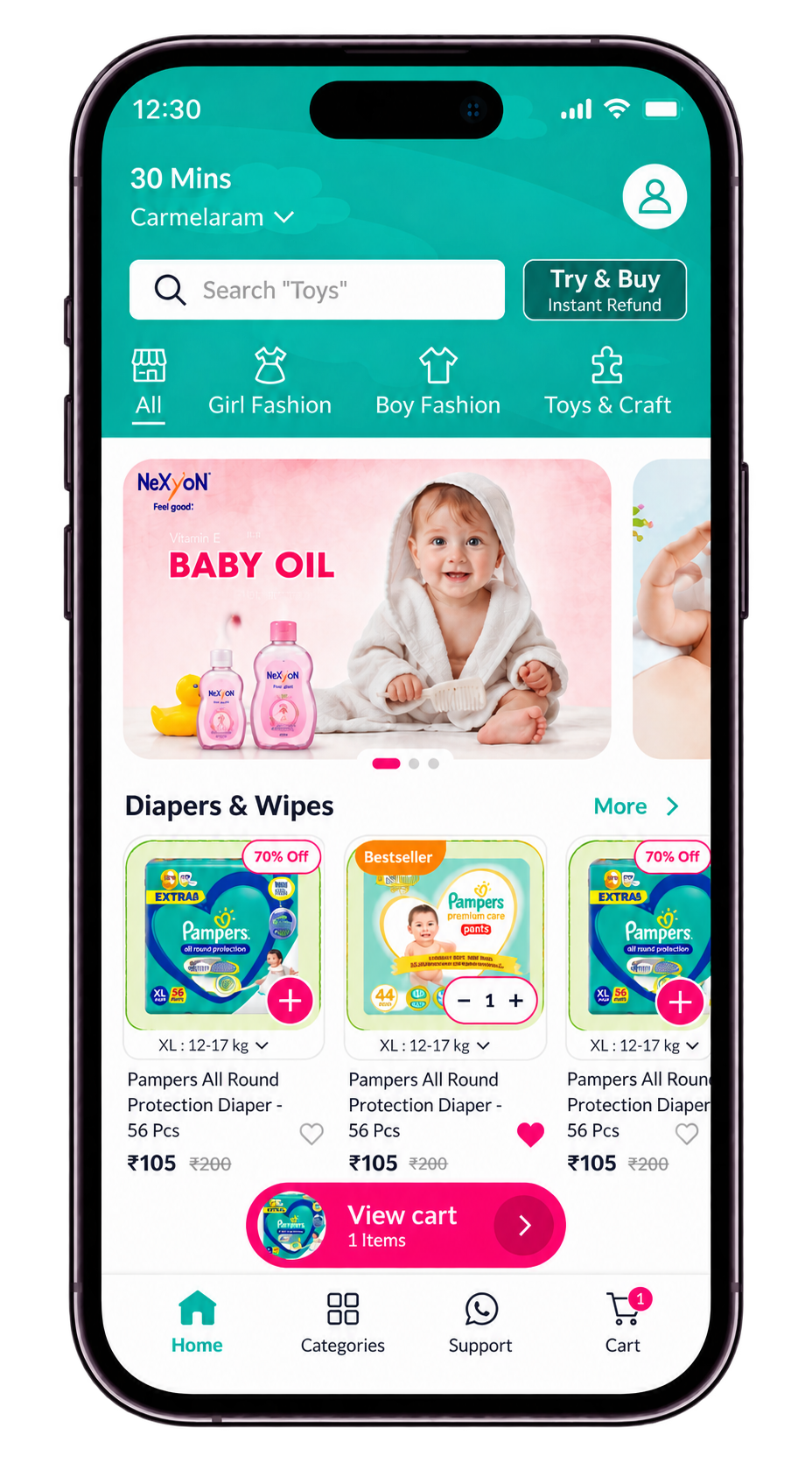
Try & Buy is introduced before parents begin making detailed product decisions, so the benefit is understood as part of discovery rather than a late checkout surprise.
Iteration 1
Iteration 2
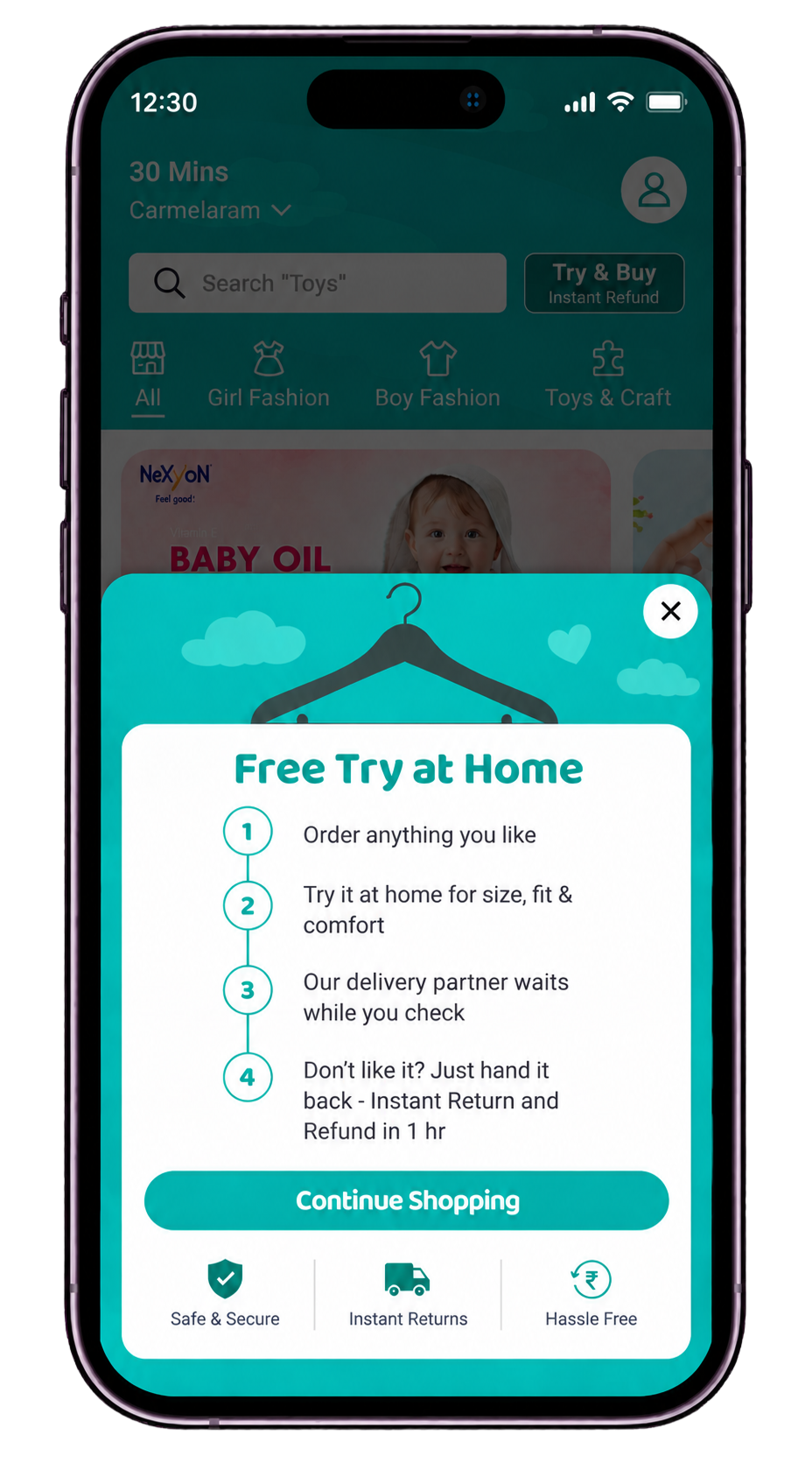
B · How Try & Buy works
Explain the promise before asking for commitment.
The instructional modal clarifies the process, sets timing expectations, and reinforces that parents can decide without pressure.
- Order anything you like.
- Try it at home for size, fit, and comfort.
- The delivery partner waits while you check.
- Hand it back for an instant return and refund if it is not suitable.
C · Product discovery
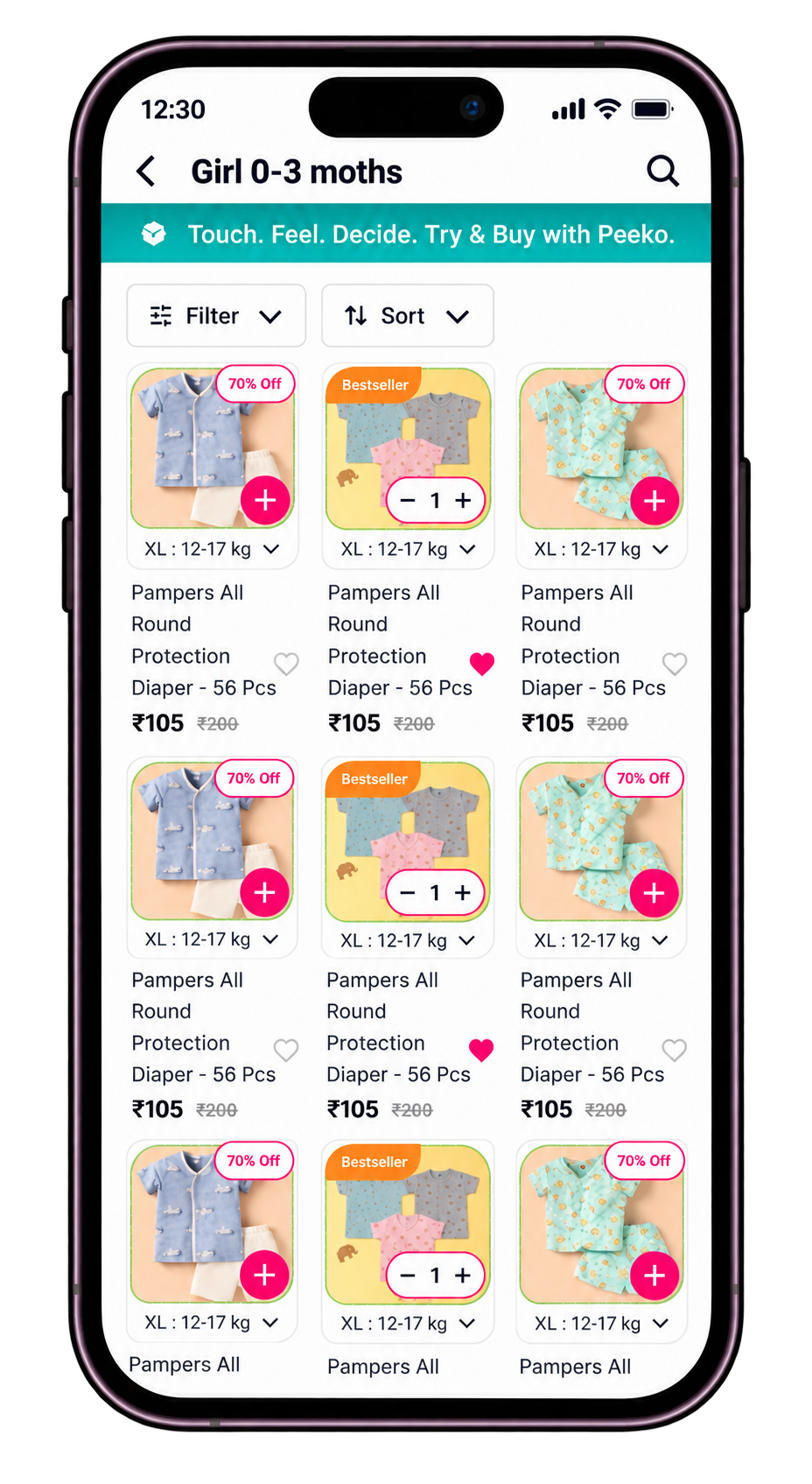
Eligibility is visible before the cart.
Short microcopy and a compact Try & Buy badge introduce confidence while parents are still comparing products—not after a decision has already been made.
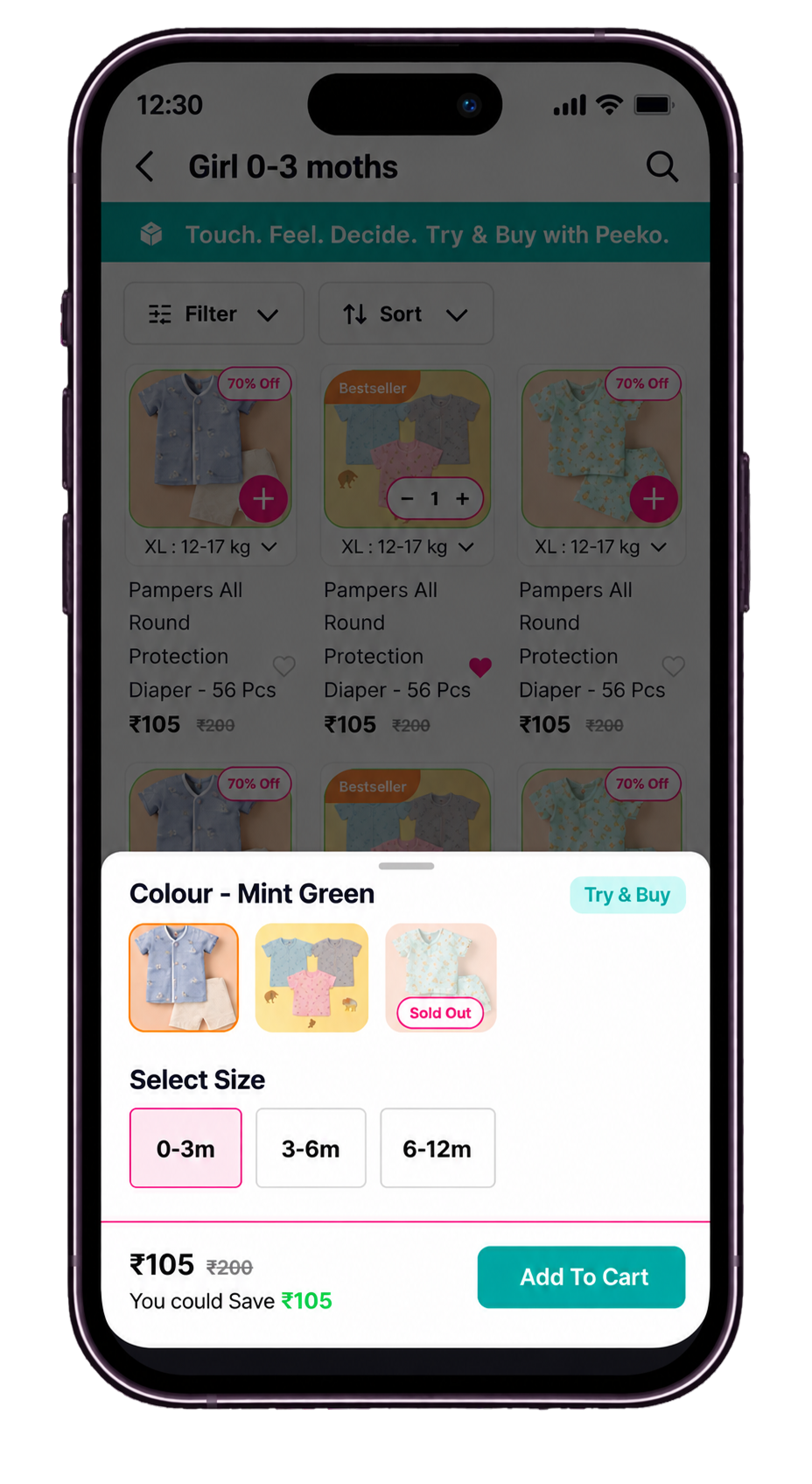
D · Eligibility & variant selection
Availability is explicit at variant level.
The selection experience distinguishes eligible products, sizes and colours from sold-out or unavailable states, preventing false expectations before checkout.
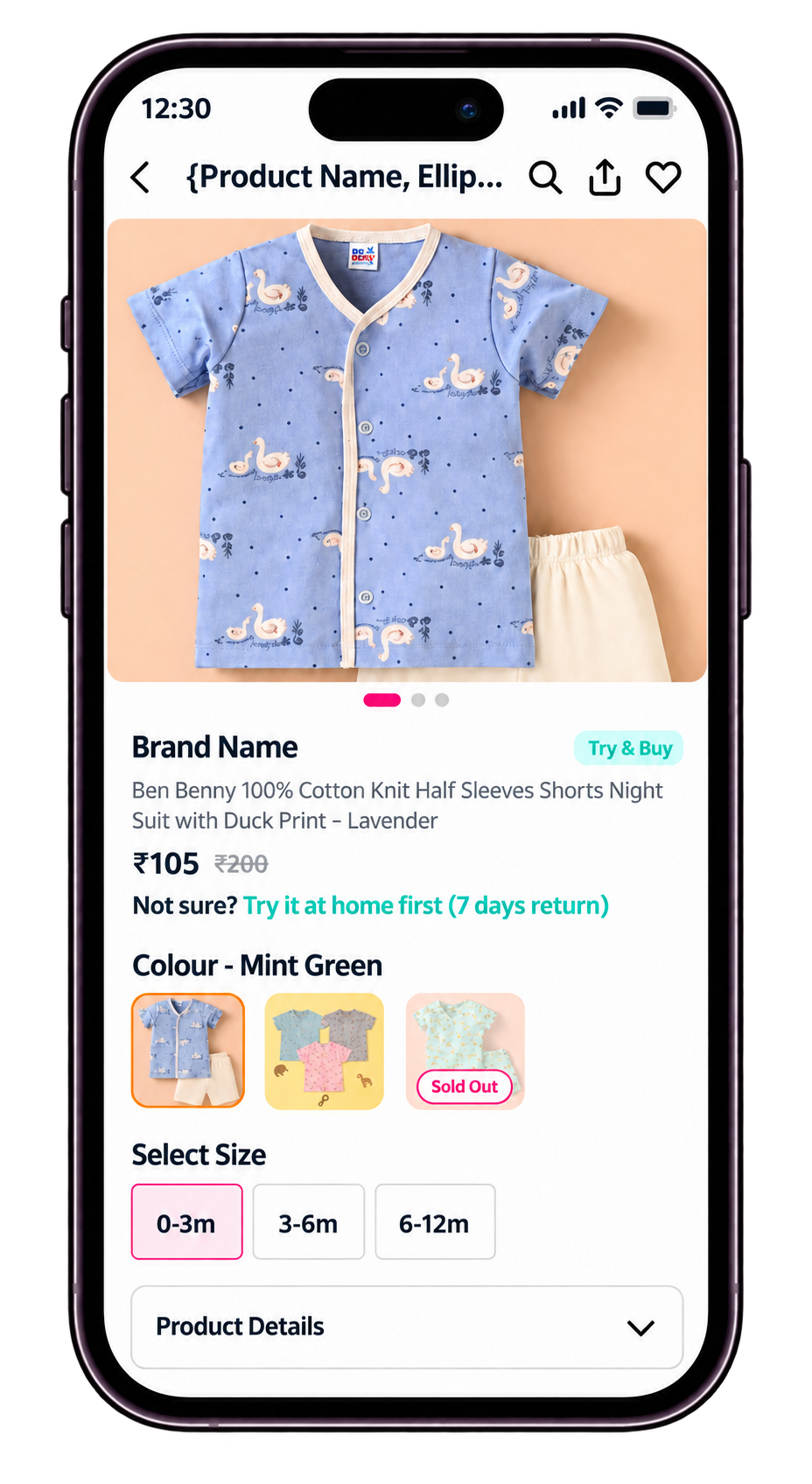
E · Product decision
Make Try & Buy visible at the product decision.
The product-detail experience keeps the Try & Buy badge, return reassurance, colour choices, size selection, and product details visible together.
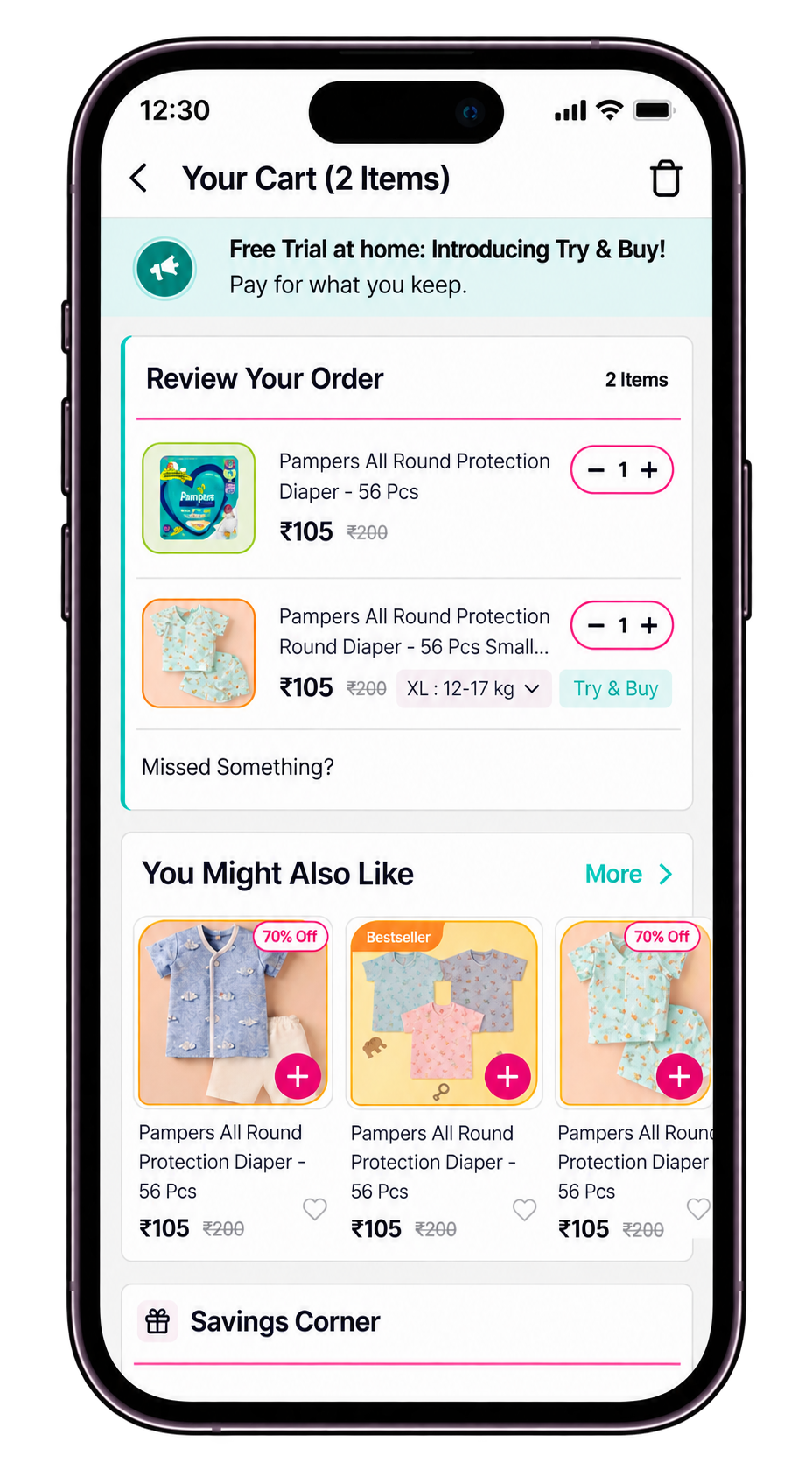
F · Cart
Keep Try & Buy clear inside a familiar cart.
The cart distinguishes regular and Try & Buy items while keeping item review, recommendations, and Savings Corner familiar.
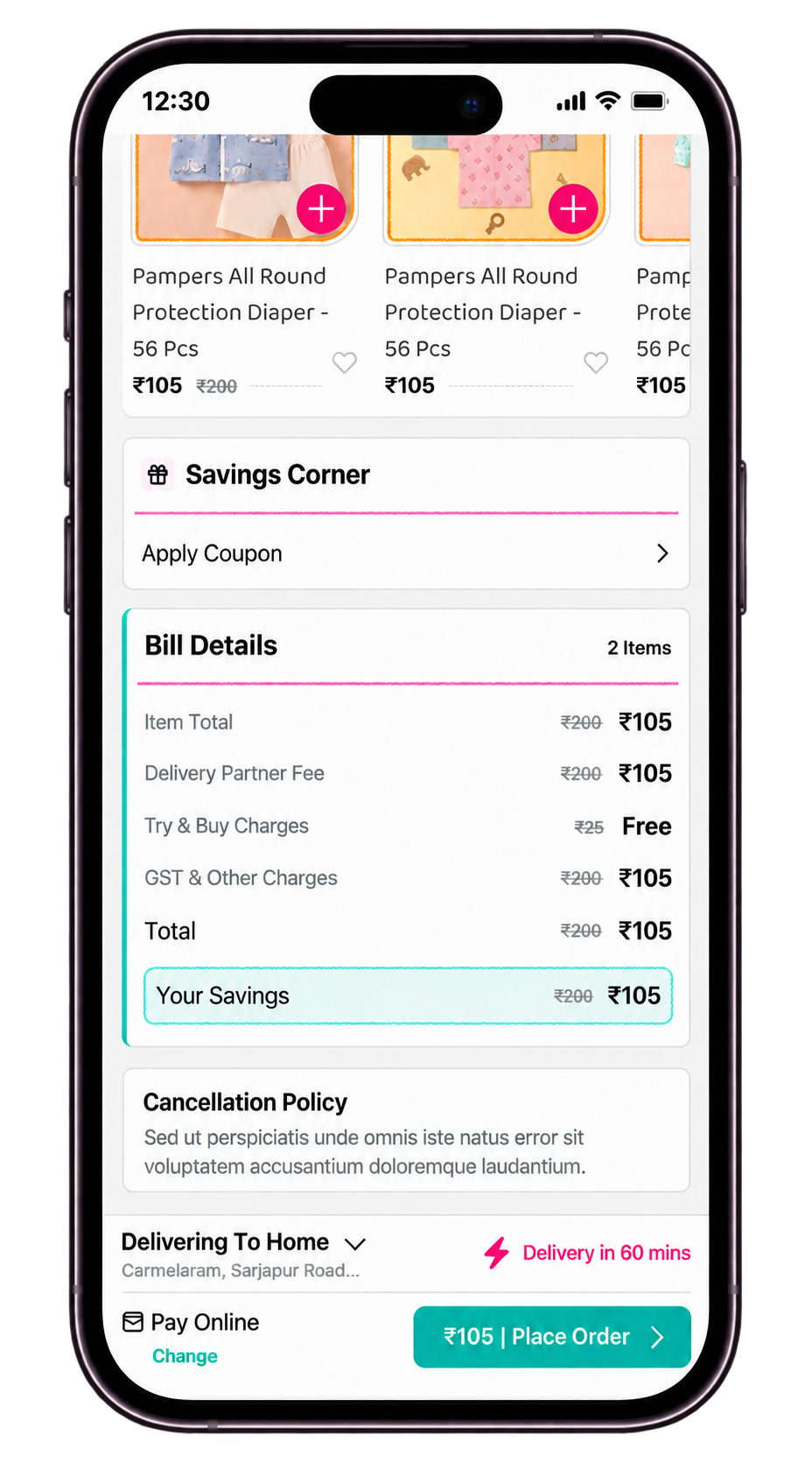
G · Billing & transparency
The final review removes hidden surprises.
Bill Details keeps item price, delivery fee, FREE Try & Buy charges, savings, cancellation policy, and delivery expectations visible together.
04 · Impact
Building confidence led to stronger purchase outcomes.
Project results showed lower cart abandonment, higher conversion, faster purchase decisions, and greater repeat-purchase likelihood. Together, these outcomes support the value of making Try & Buy clear and reassuring throughout the shopping journey.
Closing thought
Try & Buy addressed more than conversion. It connected a business opportunity to a documented trust gap, then carried reassurance from discovery through billing and returns.
01 · Challenge
Unify complex insurance administration without hiding operational detail.
Enterprise insurance administration
A central workspace for onboarding, monitoring systems, managing integrations, and reviewing communication activity.
UX/UI Designer
I synthesised the domain and product context into information architecture, workflows, wireframes, interface hierarchy, and final UI.
Admin Module
Dashboard, system status, integrations, communication configuration and logs, and connected administrative workflows.
Core challengeThe portal needed to surface Business Central and Data Lake activity, system health, integrations, and communication records without turning the dashboard into another layer of operational noise.
02 · Research
Map the operational questions before shaping the interface.
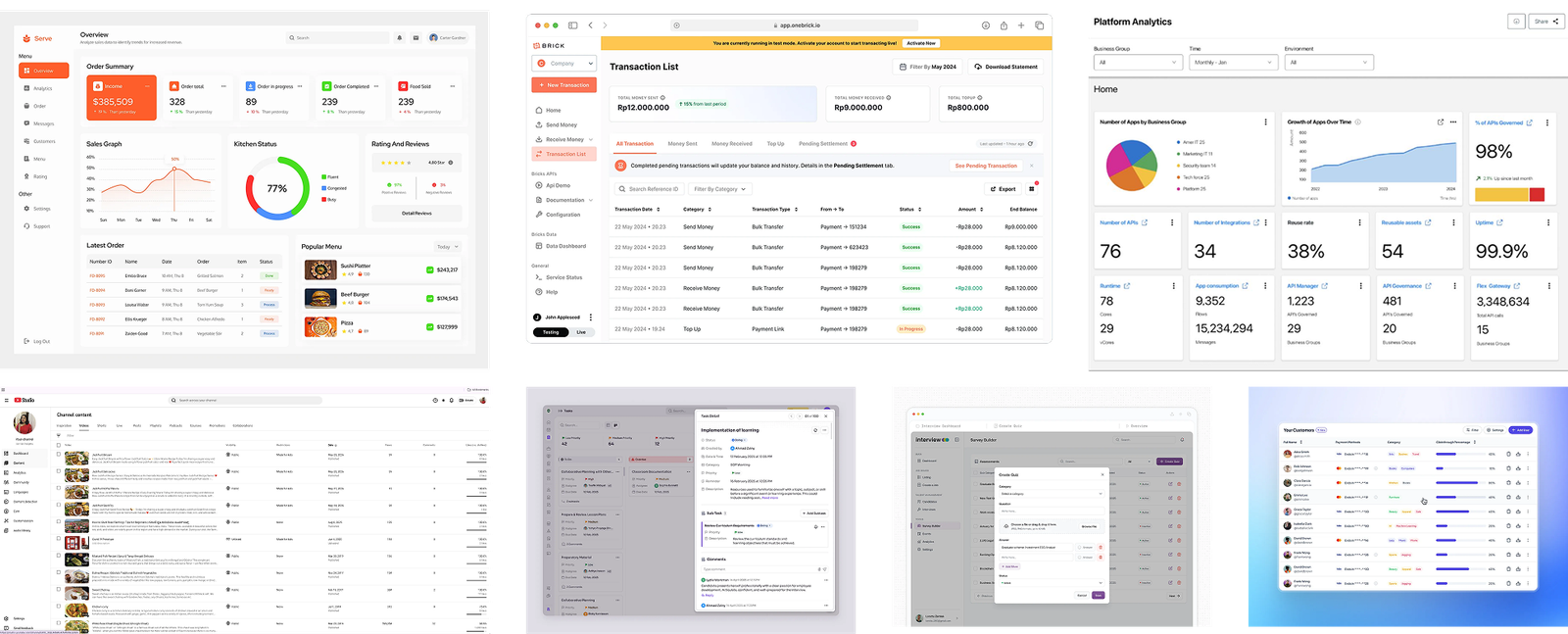
I combined domain understanding, existing-system analysis, workflow mapping, and reference review to identify what administrators needed to scan, compare, configure, and investigate.
Operational density
System status, API performance, load, activity, and integration health competed for attention.
Connected workflows
Monitoring, configuration, and investigation needed to feel connected rather than like separate tools.
Scan before detail
Administrators needed a fast overview before opening a specific system, connection, or log record.
Reusable patterns
Navigation, filters, status treatments, tables, and contextual details needed to behave consistently across modules.
Context preservation
Frequent actions and record details needed to stay close to the information that prompted them.
03 · Information Architecture
Organise the portal around administrative intent.
I separated five primary modules, then nested configuration and logs under Communication. This gives administrators a direct path from login to a module, and from the module to its relevant information and actions.
Centralize related modulesGroup by user intentReduce navigation effortSupport future scale
SSO Login (Admin)
Dashboard
Communication
Status Management
Email Templates
Translations
Dashboard
Top Navigation
- Header
- Profile
- Notification
- Logout
Overview
- Business Central
- User Activity
- Data Lake
Customize
- Business Central
- User Activity
- Data Lake
- System Health
- System Load
- Integration Health
- Recent Activity
- Quick Links
Integration Health
- Connection ID
- System Status
- Connection Name
- Connection Type
Recent Activity
- Activity Feed
- View More
Quick Links
- View Communication Logs
- Manage Users
- Status Updates
- Email Templates
- Bank Holidays
- Translations
Communication
Configuration
Filters
- All Types
- All Status
- All Environment
- Search
Table
- Connection ID
- Connection Type
- Third Party
- Environment
- Auth Type
- Timestamp
- Schedule
- Status
- Actions
Logs
Filters
- All Directions
- All Status
- Date
- Search
Table
- Log ID
- Timestamp
- Direction
- Status
- Response Time
- API Connection
- Environment
- Order References
- Actions
04 · Solution
Move from operational overview to focused action without losing context.
The proposed system combines a scannable dashboard, predictable module navigation, compact status patterns, and contextual detail views across the core administration workflows.
A · Wireframes
Test the information hierarchy before adding visual weight.
The wireframes established what belonged in the overview, what required a table, and where administrators needed a direct path into detail or action.
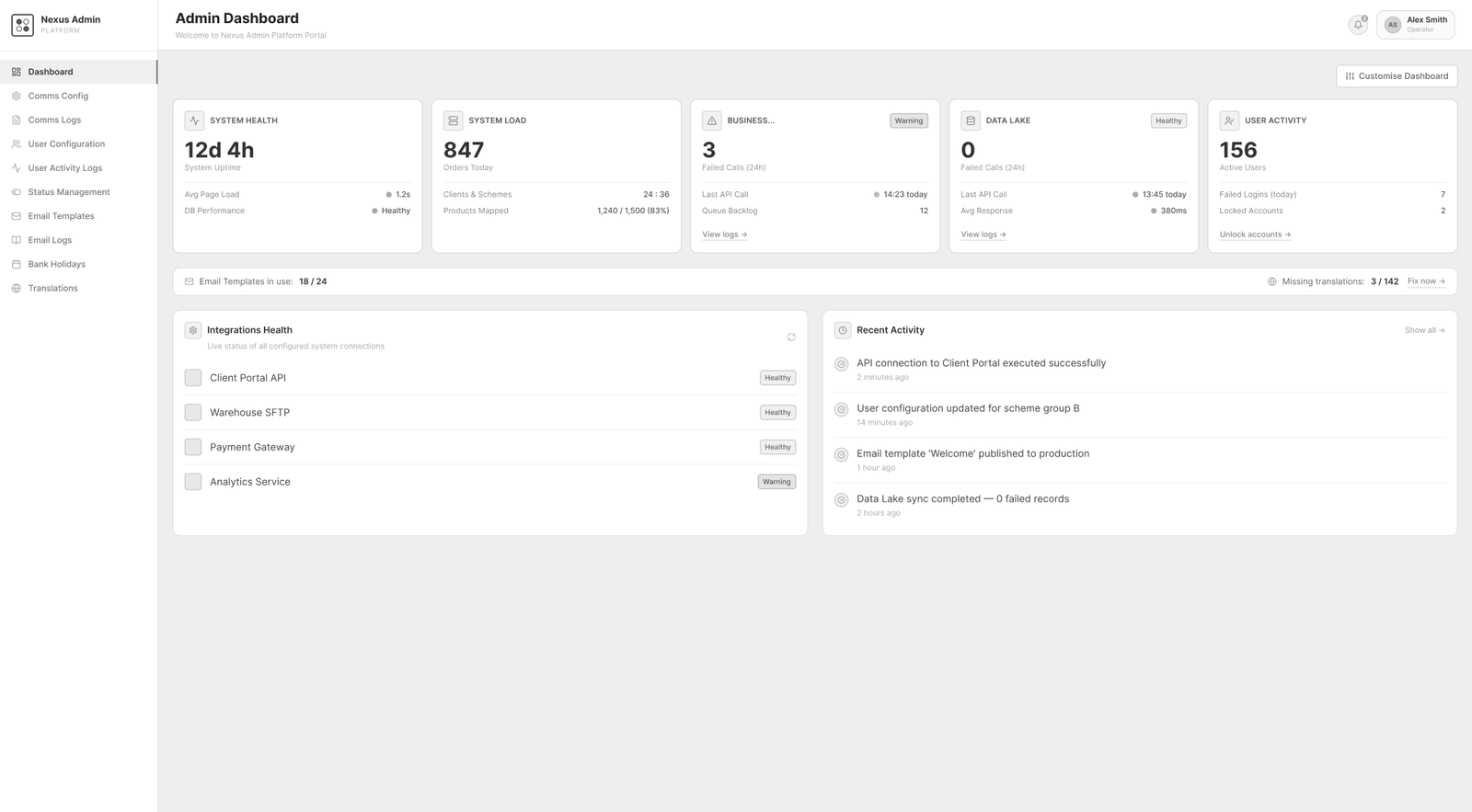
B · Dashboard Evolution
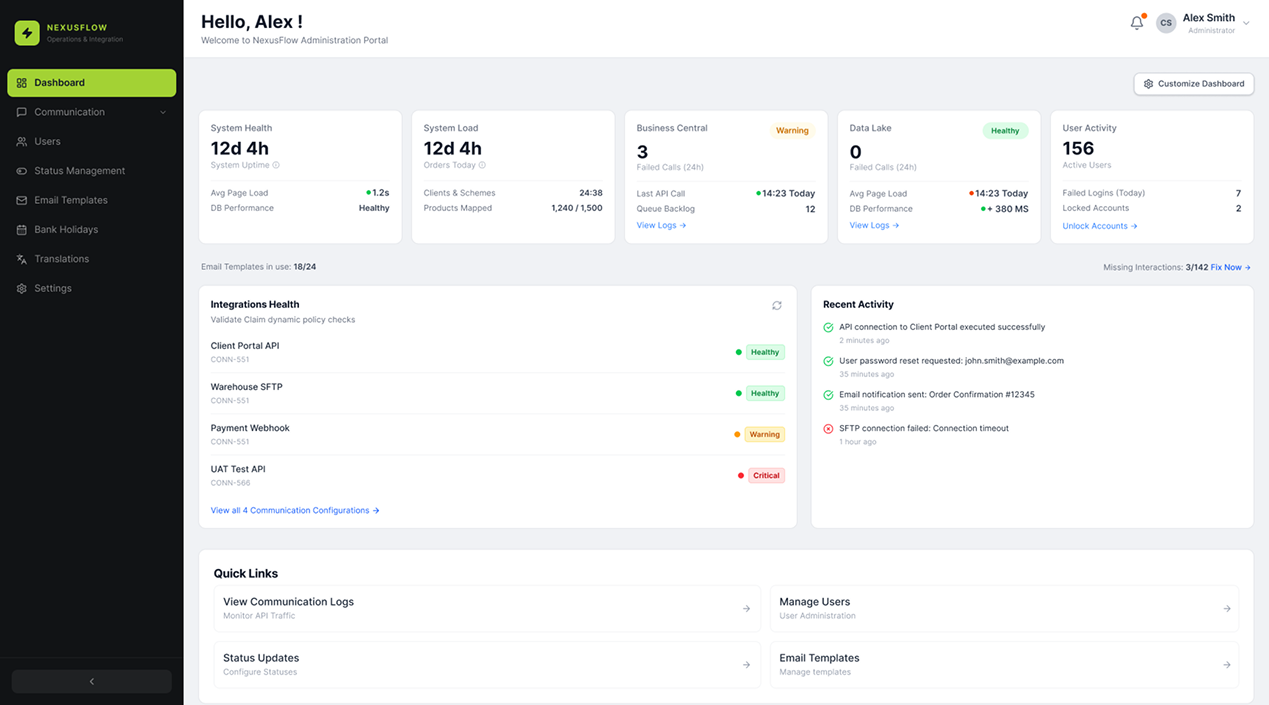
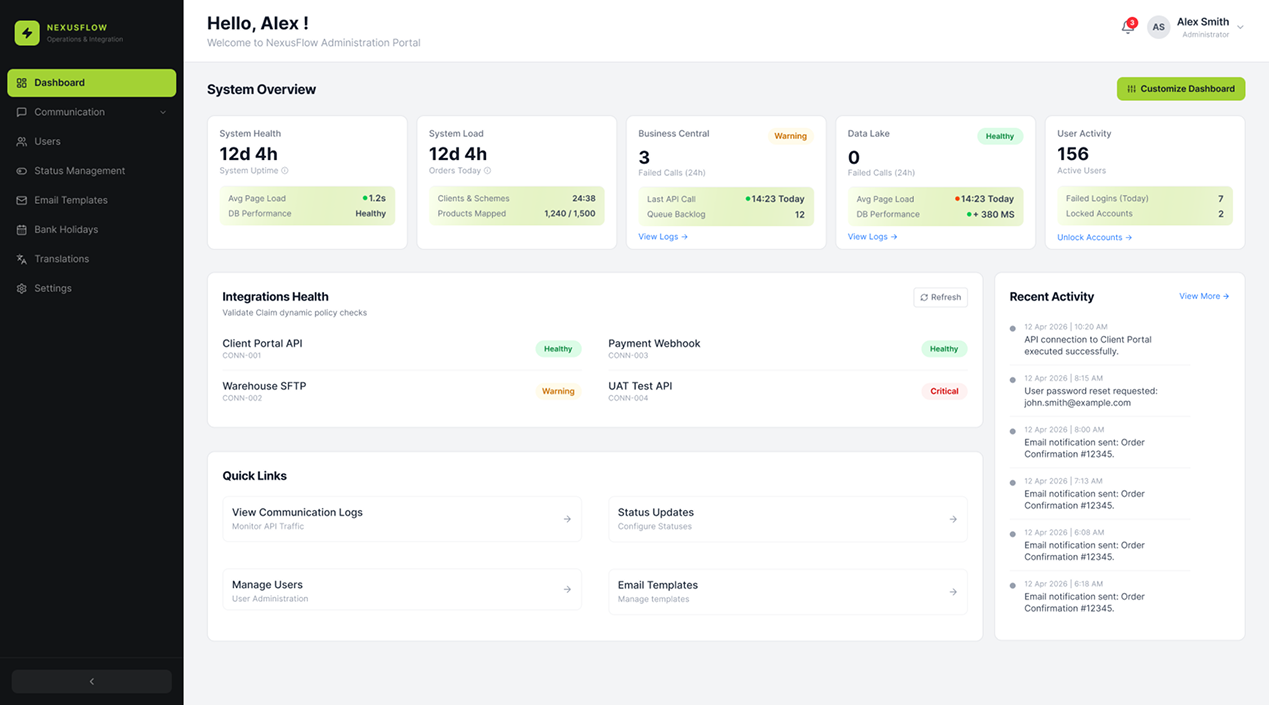
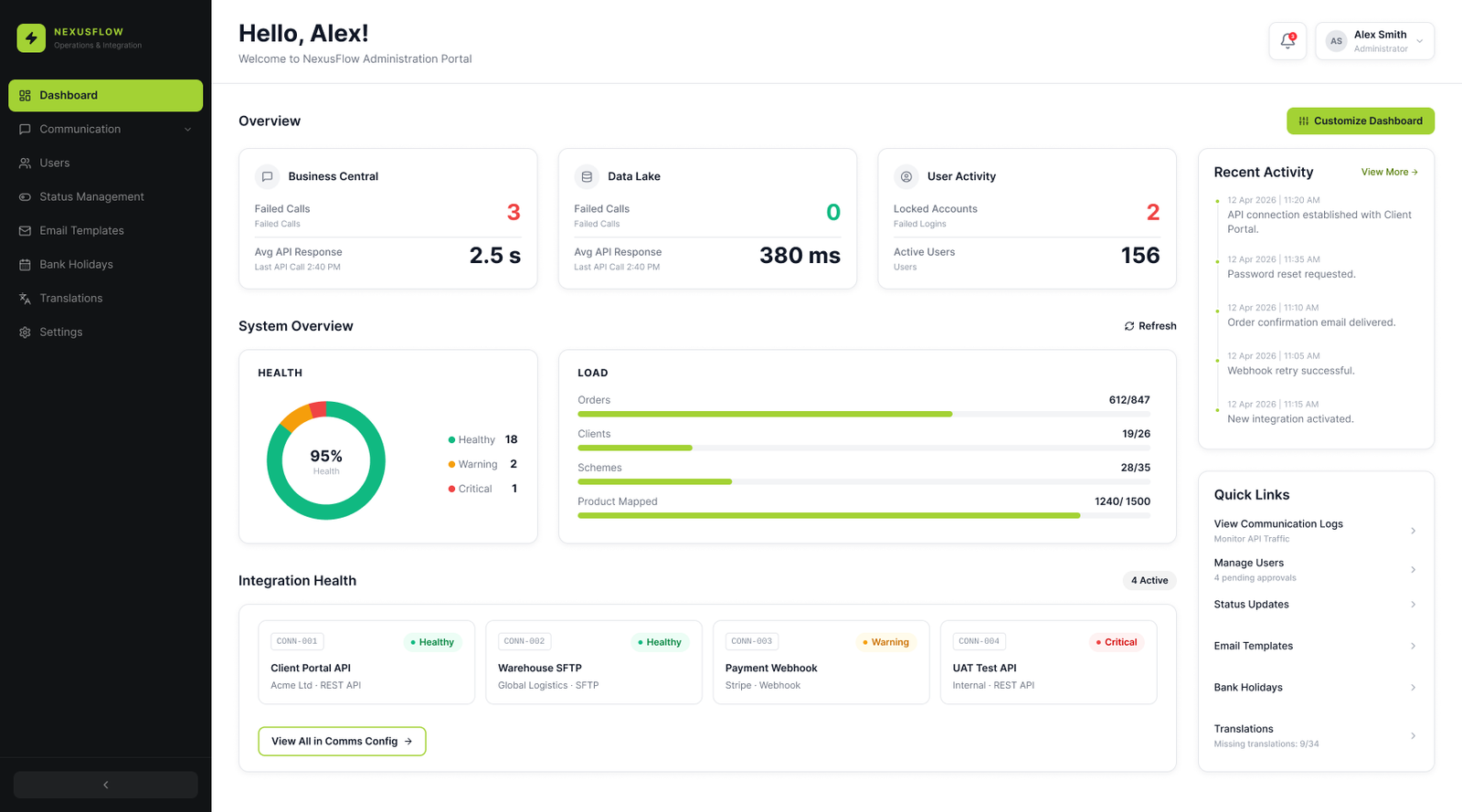
Reduce competing surfaces so status carries the signal.
The first iteration established coverage; the second regrouped related information; the final direction reduced colour and surface competition so system health, load, and exceptions remained prominent.
C · Final Dashboard
A complete operational picture without unnecessary noise.
Business systems and user activity establish the overview; health, load, integrations, and recent activity then support monitoring; quick links keep frequent actions visible.
Business Central is an external system connected through APIs, while the Data Lake is the centralised repository. Surfacing failed calls, response time, load, and connection health together is intended to help administrators identify where investigation should begin.
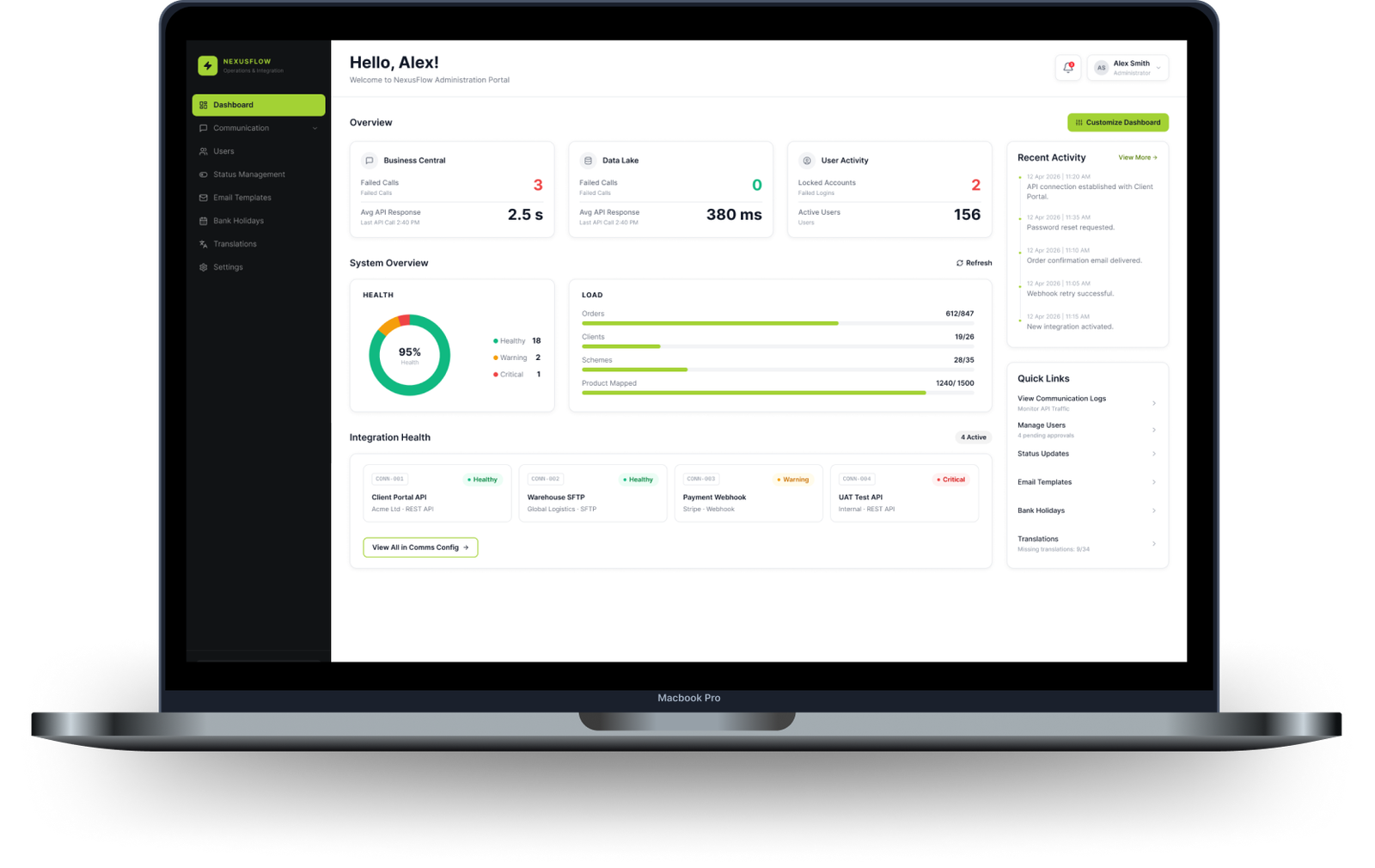
- Business systems
- User activity
- System health
- System load
- Integration health
- Recent activity
- Quick links
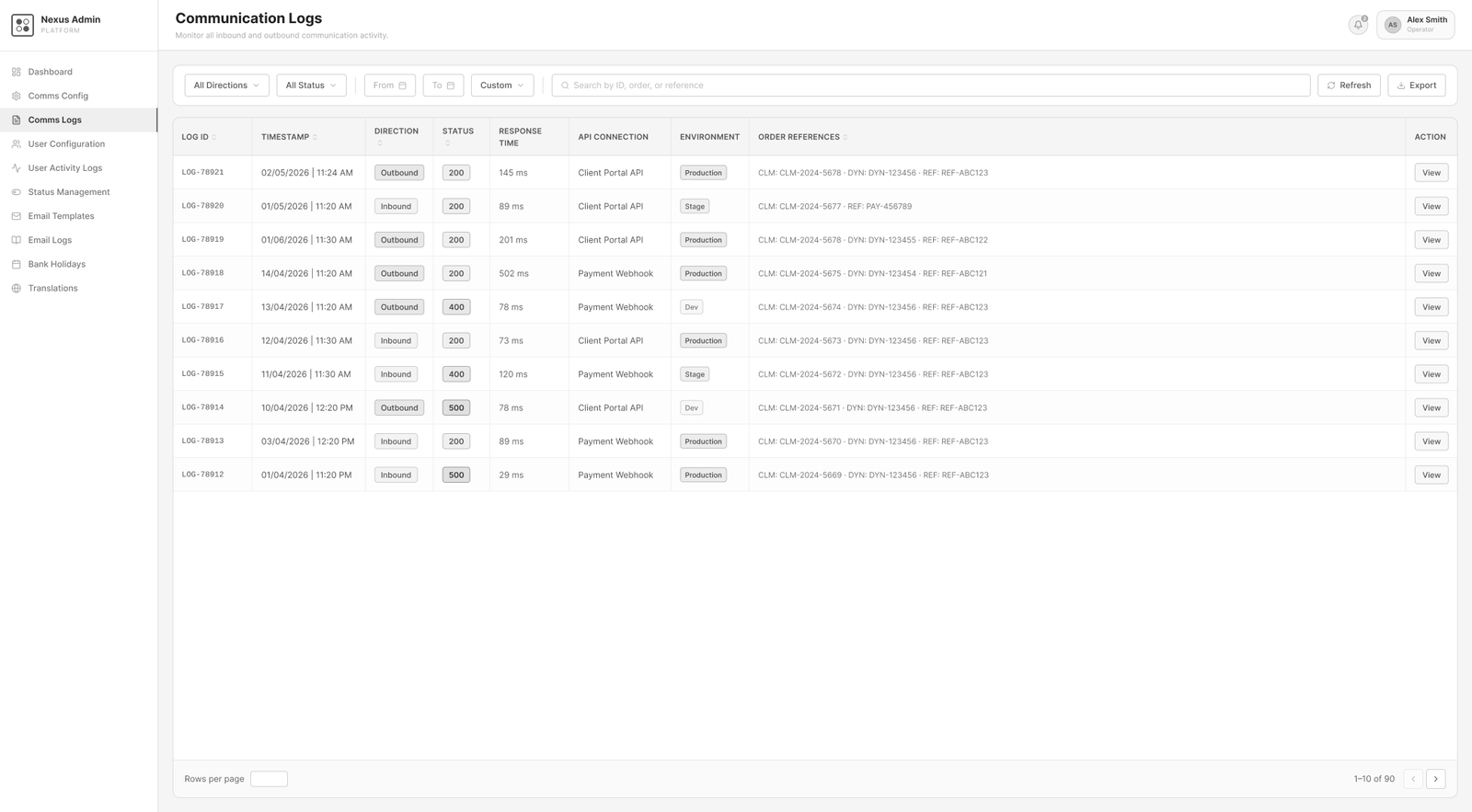
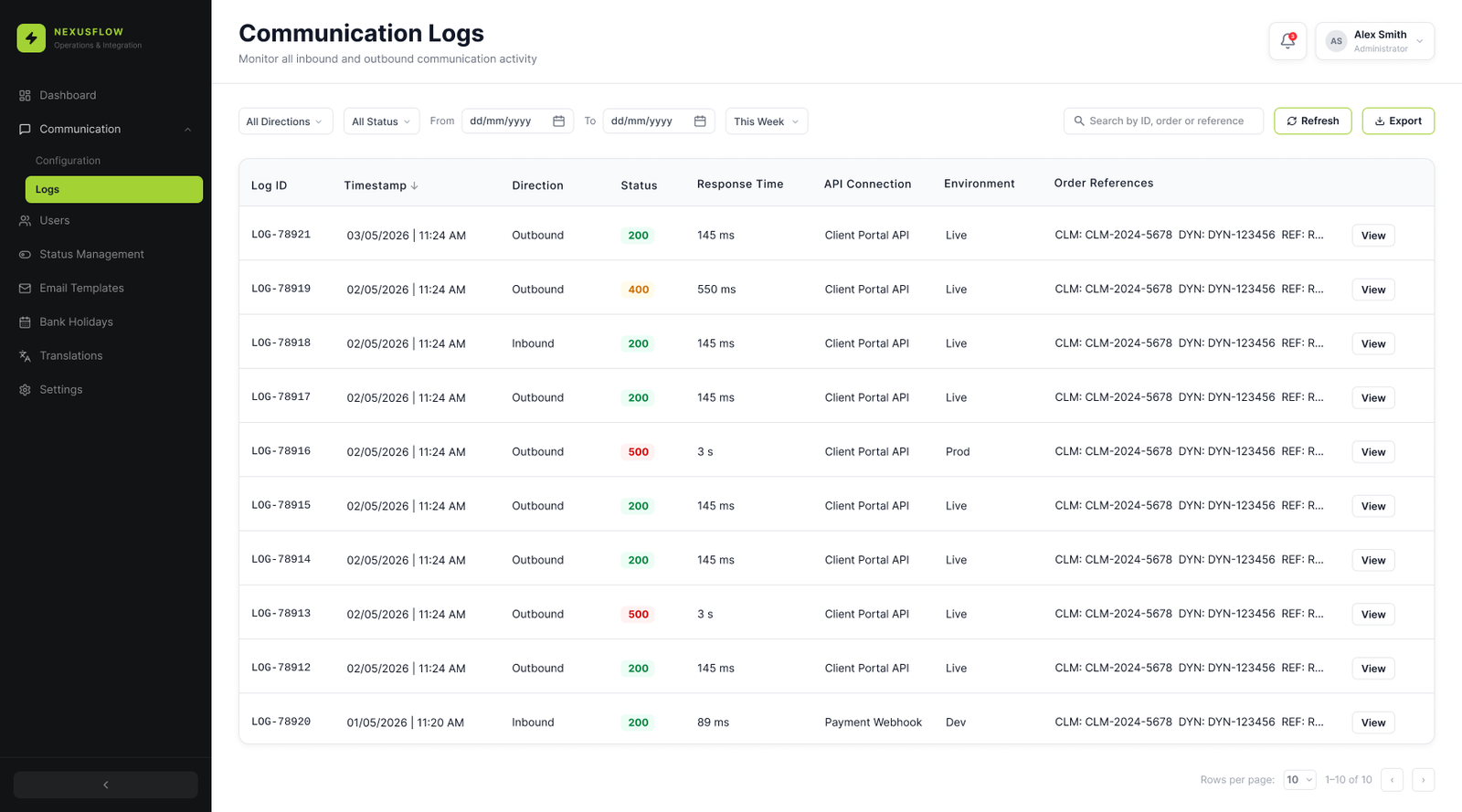
D · Communication Logs
Scan communication activity, then investigate without leaving the list.
Direction, status, response time, API connection, environment, and order references support comparison in the table. A contextual detail view keeps the selected record beside that operational context.
05 · Workflows
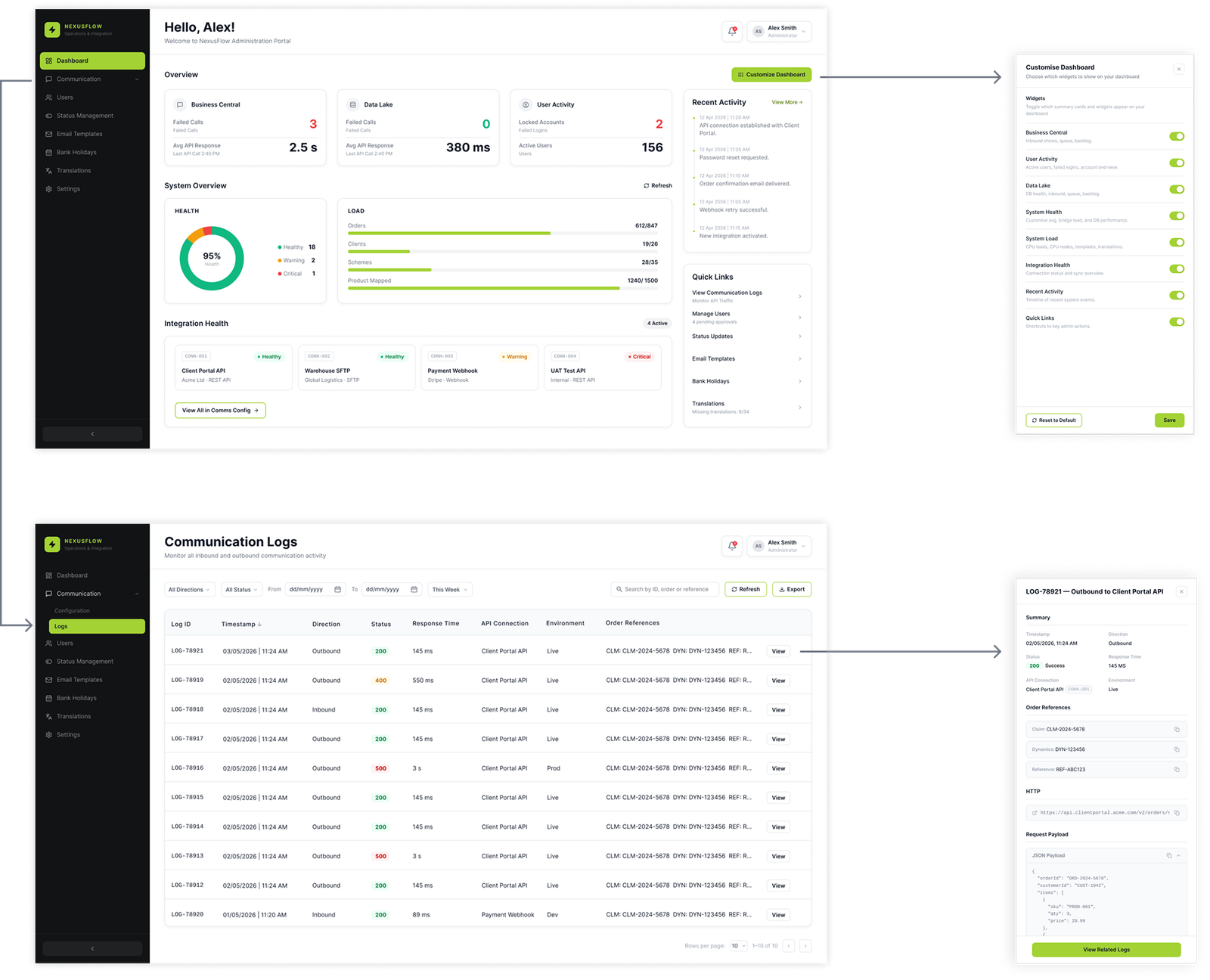
Keep configuration and investigation connected to their starting context.
The workflows demonstrate how an administrator can move from the dashboard into configuration, or from a communication list into a specific record, without unnecessary page changes.
Overview to configuration and investigation.
Administrators can customize the dashboard, move into Communication Logs, and inspect a record without losing the list context.
Design contribution
A scalable foundation for complex administration.
The proposed design consolidates fragmented tasks into a coherent system with clearer hierarchy, reusable interaction patterns, visible status, and contextual actions. These choices are intended to reduce navigation effort and support future modules; quantitative operational results were not available.
- Centralized administration
- Clear information hierarchy
- Reusable interaction patterns
- Context-preserving actions
Complete case study
Project story
